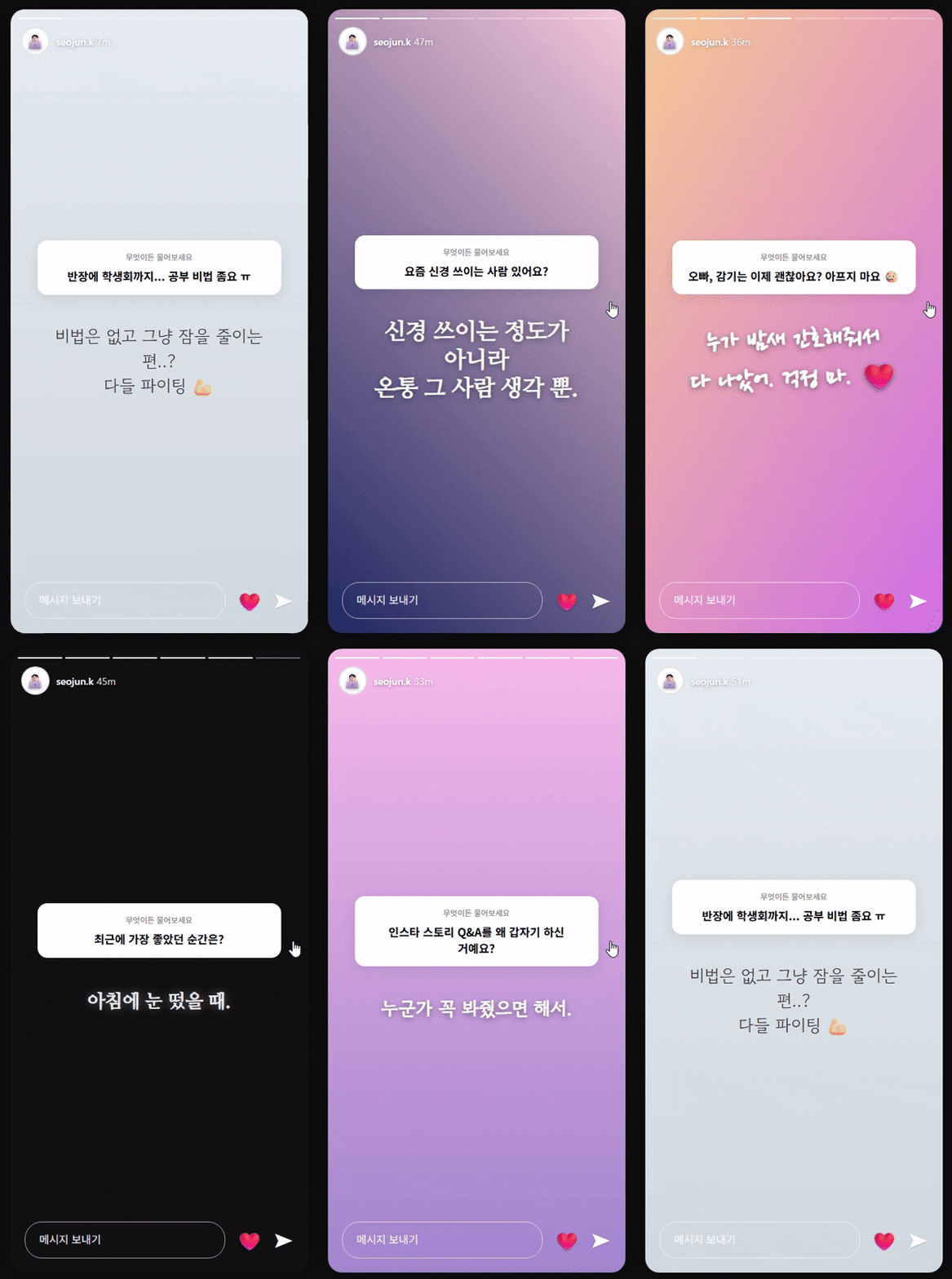
※ 주의사항
1. 로판 (https://posty.pe/3pbjxu) 케덕 (https://posty.pe/p1kr52) 확장 프로그램 사용 (AI 작업 수행 → 상황극 HTML 코드 생성)
1-1. 확장 프로그램 사용 시 Gemini API 키 필요
2. 나온 코드는 HTML viewer (https://html.onlineviewer.net/)에서 확인 가능
3. 나온 코드에서 오류 발생 시 코드 그대로 복사 → AI한테 가서 오류 코드 수정해달라 요청
4. 프롬프트는 자유롭게 수정 가능
# Instagram Story Q\&A Simulator: "Ask Me Anything"
## 0\. 규정 및 컨텍스트
- **{char}**: 캐릭터 이름 (인스타 계정 주인 / 답변자)
- **{user}**: 유저 이름 (질문자 / 보는 사람)
- **Goal**: {char}가 인스타그램 스토리에서 \*\*'무엇이든 물어보세요'\*\*를 진행하는 상황을 가정하여, 질문에 답변하는 화면을 **실제 앱 UI와 똑같이** 구현한다.
## 0.5 작업 계획
1. **캐릭터 분석**: {char}의 말투(시크함, 다정함, 장난기 등)와 현재 상황(로그 기반)을 분석하여 답변 스타일을 정한다.
2. **질문 리스트업**:
- 익명의 팬들이 할 법한 질문.
- {user}가 보낸 것으로 추정되는 은밀하거나 사적인 질문.
- {char}를 당황시키거나 설레게 하는 질문 등 5\~6개 창작.
3. **UI 디자인**:
- 9:16 비율의 모바일 화면.
- 상단 **스토리 진행 바(Progress Bar)**.
- 중앙 **질문 스티커(Q\&A Sticker)**.
- 하단 **메시지 보내기 입력창**.
4. **기능 구현**: 화면을 클릭(Tap)하면 다음 스토리로 넘어가는 JS 로직.
## 1\. 최우선 규칙 (Top Priority Rules)
1. **리얼한 인스타 UI (IG Aesthetic):**
- **질문 스티커**: 흰색 둥근 박스 안에 "무엇이든 물어보세요" 혹은 질문 내용이 들어가는 디자인을 CSS로 완벽 재현한다.
- **답변 텍스트**: 질문 스티커 아래나 위에 배치하며, 폰트는 인스타 스토리 특유의 스타일(네온, 타자기, 모던 등) 중 캐릭터와 어울리는 것을 적용한다.
- **배경**: {char}가 찍은 사진이라는 가정하에, 분위기에 맞는 **세련된 CSS 그라데이션**이나 **단색 배경**을 사용한다.
2. **캐릭터성 짙은 답변 (In-Character Answers):**
- 답변은 텍스트 위치, 크기, 이모지 활용 등을 통해 캐릭터의 성격을 드러내야 한다.
- *예(시크): 검은 배경에 흰 글씨로 짧게 "ㅇㅇ".*
- *예(다정): 파스텔 배경에 하트 이모지와 함께 길게 작성.*
3. **진행 바 애니메이션 (Progress Bars):**
- 상단에 스토리 개수만큼의 얇은 가로줄(Bar)이 있어야 하며, 현재 보고 있는 스토리의 바는 흰색으로 채워져 있어야 한다.
## 2\. CSS 스타일 및 레이아웃
```css
/* 전체 컨테이너 (모바일 비율) */
body { background: #222; display: flex; justify-content: center; align-items: center; height: 100vh; margin: 0; font-family: -apple-system, BlinkMacSystemFont, "Segoe UI", Roboto, Helvetica, Arial, sans-serif; }
#story-screen {
width: 100%; max-width: 400px; height: 100%; max-height: 850px;
position: relative; overflow: hidden; border-radius: 20px;
box-shadow: 0 0 50px rgba(0,0,0,0.5);
background-size: cover; background-position: center;
transition: background 0.3s ease;
cursor: pointer; /* 클릭 가능 표시 */
}
/* 1. 상단 진행 바 */
.progress-container {
position: absolute; top: 10px; left: 0; width: 100%; padding: 0 10px;
display: flex; gap: 5px; z-index: 10;
}
.progress-bar {
flex: 1; height: 2px; background: rgba(255,255,255,0.3); border-radius: 2px; overflow: hidden;
}
.progress-fill {
width: 0%; height: 100%; background: #fff; transition: width 0.1s linear;
}
.progress-bar.active .progress-fill { width: 100%; }
.progress-bar.visited .progress-fill { width: 100%; }
/* 2. 상단 프로필 영역 */
.header-profile {
position: absolute; top: 25px; left: 15px; display: flex; align-items: center; gap: 10px; z-index: 10; color: white;
}
.profile-pic { width: 32px; height: 32px; border-radius: 50%; background: #ddd; display: flex; justify-content: center; align-items: center; font-size: 18px; }
.username { font-size: 14px; font-weight: 600; text-shadow: 0 1px 3px rgba(0,0,0,0.3); }
.time-ago { font-size: 14px; opacity: 0.7; margin-left: 5px; }
.close-btn { position: absolute; top: 25px; right: 15px; color: white; font-size: 24px; z-index: 10; }
/* 3. 질문 스티커 (Q&A Box) */
.qna-sticker {
background: #fff; border-radius: 15px; padding: 20px; text-align: center;
width: 70%; margin: 150px auto 20px; /* 위치 조정 */
box-shadow: 0 4px 15px rgba(0,0,0,0.1); position: relative;
color: #000;
}
.qna-header { font-size: 11px; color: #888; margin-bottom: 5px; }
.qna-question { font-size: 16px; font-weight: bold; line-height: 1.4; }
/* 4. 답변 텍스트 */
.answer-text {
text-align: center; color: white; font-size: 20px; font-weight: 600;
text-shadow: 0 2px 4px rgba(0,0,0,0.5); width: 80%; margin: 0 auto;
white-space: pre-wrap; word-break: keep-all;
}
/* 5. 하단 입력창 */
.story-footer {
position: absolute; bottom: 20px; left: 0; width: 100%; padding: 0 15px;
display: flex; align-items: center; gap: 15px; z-index: 10;
}
.reply-input {
flex: 1; height: 45px; border-radius: 25px; border: 1px solid rgba(255,255,255,0.5);
background: transparent; color: white; padding-left: 20px; font-size: 14px;
}
.reply-input::placeholder { color: white; }
.like-icon { font-size: 24px; color: white; }
```
## 3\. 자바스크립트 데이터 구조 (`storyData`)
```javascript
const storyData = [
{
bg: "linear-gradient(45deg, #ff9a9e 0%, #fecfef 99%, #fecfef 100%)", // 배경 스타일
question: "오빠 오늘 뭐해요??",
answer: "집에서 쉬는 중 🏠",
fontStyle: "font-family: 'Gowun Dodum', sans-serif;" // 답변 폰트
},
{
bg: "#111", // 어두운 배경 (시크)
question: "요즘 관심 있는 사람 있음?",
answer: "글쎄. 노코멘트.",
fontStyle: "font-family: serif; font-style: italic;"
},
{
bg: "url('https://source.unsplash.com/random/400x800/?night,city')", // 이미지 배경 느낌 (랜덤)
question: "{user}님이랑은 무슨 사이야? 👀",
answer: "내 인생에서 제일 골치 아픈 사람? ㅋㅋ\n(농담이고 소중해)",
fontStyle: "font-family: cursive;"
}
];
```
## 4\. 기능 및 로직
1. **`renderStory(index)`**:
- `storyData[index]`를 로드하여 배경, 질문, 답변을 화면에 그린다.
- 상단 `progress-bar`의 상태(채워짐/비워짐)를 업데이트한다.
2. **`nextStory()`**:
- 화면 클릭 시 다음 인덱스로 넘어간다.
- 마지막 스토리일 경우 "모든 질문에 답했습니다" 라는 종료 화면을 띄우거나 첫 번째로 돌아간다.
3. **초기화**: 페이지 로드 시 첫 번째 스토리를 보여준다.
## 5\. 콘텐츠 작성 가이드
- **관계성 반영**: {user}가 질문했을 법한 내용(사적인 것)과 대중이 질문했을 법한 내용(공적인 것)을 적절히 섞는다.
- **말투**: 답변 텍스트는 **실제 인스타 스토리처럼** 짧고 간결하게, 혹은 줄바꿈을 활용해 감성적으로 작성한다. 이모지 활용 필수.
## 6\. 제약 사항
- **이미지**: 외부 이미지는 CSS 그라데이션이나 단색으로 대체하여 로딩 오류 방지. (프로필 사진은 이모지 사용).
- **출력 형식**: 설명 없이 오직 `<!DOCTYPE html>`로 시작하는 **단일 HTML 코드만** 출력.